TWO ENGINES
Synth, sine, sample, and granular sources with independent shaping and interaction.
SOFTWARE INSTRUMENT · PRIVATE BETA
A two-engine instrument built for deep sound and hypnotic motion.
Shape a phrase, let its parts move on different cycles, and leave enough room for the sound to keep changing.
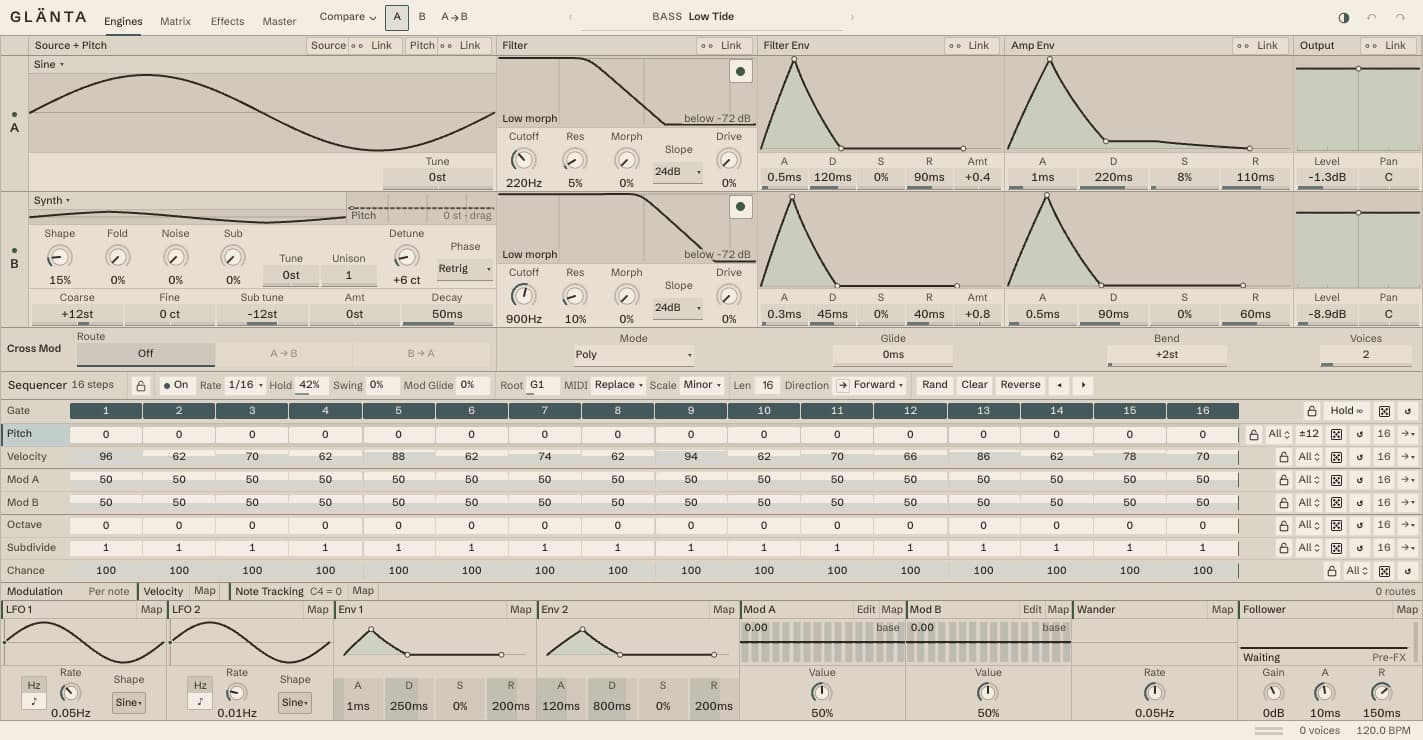
Synth, sine, sample, and granular sources with independent shaping and interaction.
Independent sequencer cycles and visible modulation for phrases that keep changing.
An ordered effects chain with parallel Echo and Space returns.
PRIVATE BETA
Enter the invite code supplied with your build access. Run the installer, then restart or rescan your host.
Checking current build…
Run the downloaded installer, then reopen your music app. In Ableton Live, look under Plug-Ins and load Glänta on a MIDI track. If it doesn’t appear, rescan plug-ins in your host’s settings and check that AU or VST3 plug-ins are enabled.
Choose a sound and arm the track. To play your own MIDI notes, turn the sequencer off. To use its pattern, turn it on and start your host’s transport. Save your session and keep its previous installer before updating an existing project.
Need help with a download, installation, or sound? Email hello@teddywilson.me with your macOS version, music app, and Glänta build name. Keep your invite code private.